When organizations move from legacy systems to modern platforms, the most critical hurdle is not the software itself but the data. Data migration challenges often determine whether an ERP or cloud adoption succeeds or stalls.
At Liberty Grove Software, we’ve seen firsthand how careful planning around mapping, cleansing, transformation, and reconciliation makes the difference between a smooth transition and a painful one.
Migrating data is rarely just a matter of “lift and shift.”
Legacy systems carry decades of history, inconsistencies, and redundancies. Without a solid enterprise data migration strategy, companies risk bringing confusion forward into the new environment.
Done right, however, migration becomes more than a technical step; it’s an opportunity to modernize, improve governance, and build trust in data-driven decision-making.
What Are the Key Considerations When Migrating Data from a Legacy System to the Cloud?
A common question clients ask me is: “What are the things that we should consider when migrating data from legacy systems?”
From our experience, three stand out:
| Scope of data | Decide what is essential to migrate and what can be archived. Not every historical transaction needs to live in the new system. |
| Compliance requirements | Retain the fields and records required for regulatory reporting or audit, even if they’re no longer central to operations. |
| Future usability | Structure the data in a way that supports reporting, analytics, and business growth. |
An enterprise data migration strategy should strike a balance between short-term needs (going live quickly) and long-term value (ensuring the data supports decision-making for years to come).
Step One: Data Mapping – Setting the Blueprint
Data mapping is the foundation of every migration project. It’s about aligning legacy fields with new structures. That’s where data mapping best practices come in:
- Engage stakeholders: The business understands data meaning better than IT alone.
- Document thoroughly: Long projects need consistent reference points.
- Address custom fields: Legacy customizations may require creative solutions.
Many clients ask: “Which data mapping and transformation tools are best suited for complex enterprise migrations?”
The answer depends on the scale and complexity, but ETL (extract, transform, load) platforms, combined with ERP-native import frameworks, usually provide the best balance of power and flexibility.
Increasingly, data migration automation tools also integrate AI capabilities, making mapping faster and more accurate.
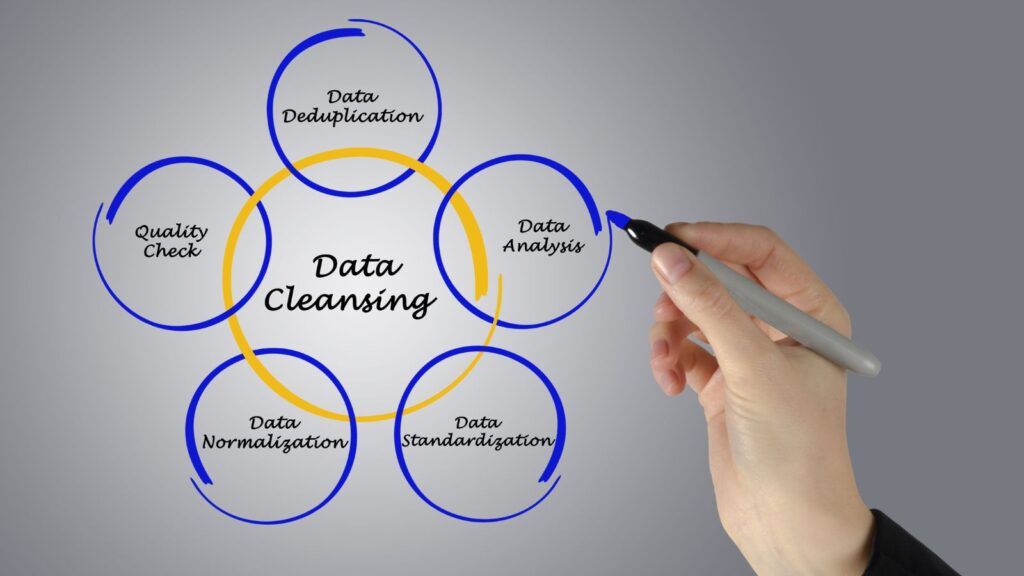
Step Two: Data Cleansing – Purging the Noise
Clean data leads to confident decision-making. Cleansing involves removing duplicates, correcting errors, and standardizing values to ensure accuracy. Examples include:
- Eliminating duplicate customer or vendor records with similar names
- Closing out inactive products
- Standardizing postal codes, tax IDs, and addresses
That’s also where AI makes a difference. Traditional rules can only catch so much. With AI in data migration, fuzzy matching models and anomaly detection can identify errors humans often miss.
A frequent client concern is: “How can AI or ML techniques help in automating data cleansing, transformation, and reconciliation during migration?”
In practice, AI can:
- Detect duplicates with higher accuracy
- Predict missing values based on patterns
- Flag outliers that don’t fit the expected rules
The result? Cleaner data with less manual labor.
Step Three: Data Transformation – Making It Fit
Even after mapping and cleansing, data must be reshaped to fit the new ERP or cloud environment. That’s where data transformation strategies matter.
Typical transformations include:
- Format conversions: Adjusting date or currency formats
- Hierarchy restructuring: Aligning cost centers to new dimensional models
- Normalization: Standardizing units of measure, country codes, or naming conventions
- Enrichment: Adding attributes pulled from other systems
The right tools combine automation with flexibility. AI-driven platforms can propose transformation rules based on historical data, dramatically reducing manual effort. It’s where how AI improves data migration becomes tangible: it doesn’t just process faster; it learns patterns and adapts.

Step Four: Data Reconciliation – Building Trust
Reconciliation is the final step, and often the most underestimated. Teams ask: “How would you QA / validate data before and after a migration to ensure integrity?”
The answer lies in data reconciliation in migration:
- Compare record counts between systems
- Validate trial balances and subledgers
- Ensure open invoices and transactions align
- Run dual systems briefly to confirm outputs
Automated reconciliation tools can quickly catch discrepancies, but human validation remains essential. Ultimately, reconciliation builds trust. Without it, user adoption suffers because no one fully believes the numbers.
The Biggest Pitfalls in Migration Projects
In community discussions, a common thread emerges: “What are the biggest pitfalls or gotchas that make long-running migration projects drag on for years?”
From our perspective, the pitfalls usually include:
- Underestimating data volume: Trying to migrate everything instead of focusing on what matters
- Poor documentation: Losing track of mapping and rules mid-project
- Late stakeholder involvement: Business users brought in too late to validate assumptions
- Skipping reconciliation: Declaring success without validating accuracy
These are not just nuisances; they are the reasons projects fail. Addressing them upfront keeps migrations on schedule.

How AI Is Changing the Game
The rise of AI is reshaping what’s possible in enterprise migrations. The improvement of data migration by AI is not a hypothetical concept; it’s happening now.
AI assists by:
- Automating mapping: Reducing weeks of manual setup
- Accelerating cleansing: Using ML to detect duplicates and outliers
- Guiding transformation: Recommending standardization rules
- Streamlining reconciliation: Matching transactions intelligently
Combined with data migration automation tools, AI reduces risk, accelerates timelines, and frees teams to focus on oversight rather than grunt work.
However, there’s a caveat: AI is powerful, but not infallible. Expert judgment and governance are non-negotiable. At Liberty Grove, we integrate AI tools into our migration projects while maintaining human oversight at the forefront of our approach. That balance yields the best results.
Turning Data Migration Challenges into Opportunities
Ultimately, overcoming data migration challenges is about more than moving records. It’s about:
- Creating reliable, standardized data
- Strengthening governance
- Building confidence in business reporting
- Supporting future analytics and AI initiatives
Migration is not just a hurdle; it’s a reset opportunity. Organizations that approach it strategically unlock a cleaner dataset and a stronger foundation for growth, instilling a sense of reassurance and confidence.
At Liberty Grove Software, we’ve helped clients across various industries transition confidently from legacy systems to modern ERP and cloud platforms. Whether through enterprise data migration strategy, proven data transformation strategies, or the adoption of AI in data migration, our focus remains the same: ensuring your data becomes an asset, not a liability.
Final Thoughts for Tackling Data Migration Challenges Successfully
Your new ERP or cloud system is only as good as the data it holds. By prioritizing mapping, cleansing, transformation, and reconciliation, and by leveraging AI where it adds the most value, you can overcome the toughest data migration challenges.
The path may be complex, but with the right tools, strategy, and oversight, your data migration can deliver not just a smooth transition but also a stronger future for your organization.
Let’s talk. We’ll help you start your ERP Migration Journey.
About Andrew Good

Andrew Good, CEO, Liberty Grove Software
Andrew Good, CEO of Liberty Grove Software, a leader in digital transformation, directs the company with strategic insights that deliver impactful results. With over two decades of expertise in Microsoft technologies, Andrew has guided businesses through digital transformations across various industries, including manufacturing, finance, and healthcare.
Andrew’s extensive knowledge comes from personal experiences with various companies. His hands-on operational knowledge stems from his experience in engineering and maintenance, as well as his operational roles at Unilever and Sony Music. Fourteen years of working with Microsoft Dynamics BC/NAV follows successful projects in ERP, Computerized Maintenance Management Systems (EAM), and quality systems.
His passion for technology is matched by his love for sailing, which inspires his leadership. Andrew parallels the precision required for navigating the seas with the challenges of steering a successful company. Under his leadership, Liberty Grove Software thrives, providing tailored solutions that empower clients and optimize operations with innovative, Microsoft-based systems.